My organization
Important
Only users with role admin will be able to access and change elements of My Organization.
This article explains how to view and update organization details in the dashboard. The Organization section contains administrative information associated with your account.
The Organization section shows the registration details associated with your account.
In this portal, an organization can represent a company, institution, project team, or your own individual workspace. It is used to store the main administrative and billing-related details connected with your account.
Prerequisites
No. 1 Hosting account
You need an active cloud environment hosting account and access to the portal https://my.cloud.eumetsat.int.
No. 2 Organization membership
You need to be a member of an organization in the portal. The organization data is assigned during onboarding by the operator.
No. 3 Permissions to manage organization details
To update the organization information, you need admin permissions that allow you to edit organization settings.
Overview
Open Organization in the left-side menu under Configuration.
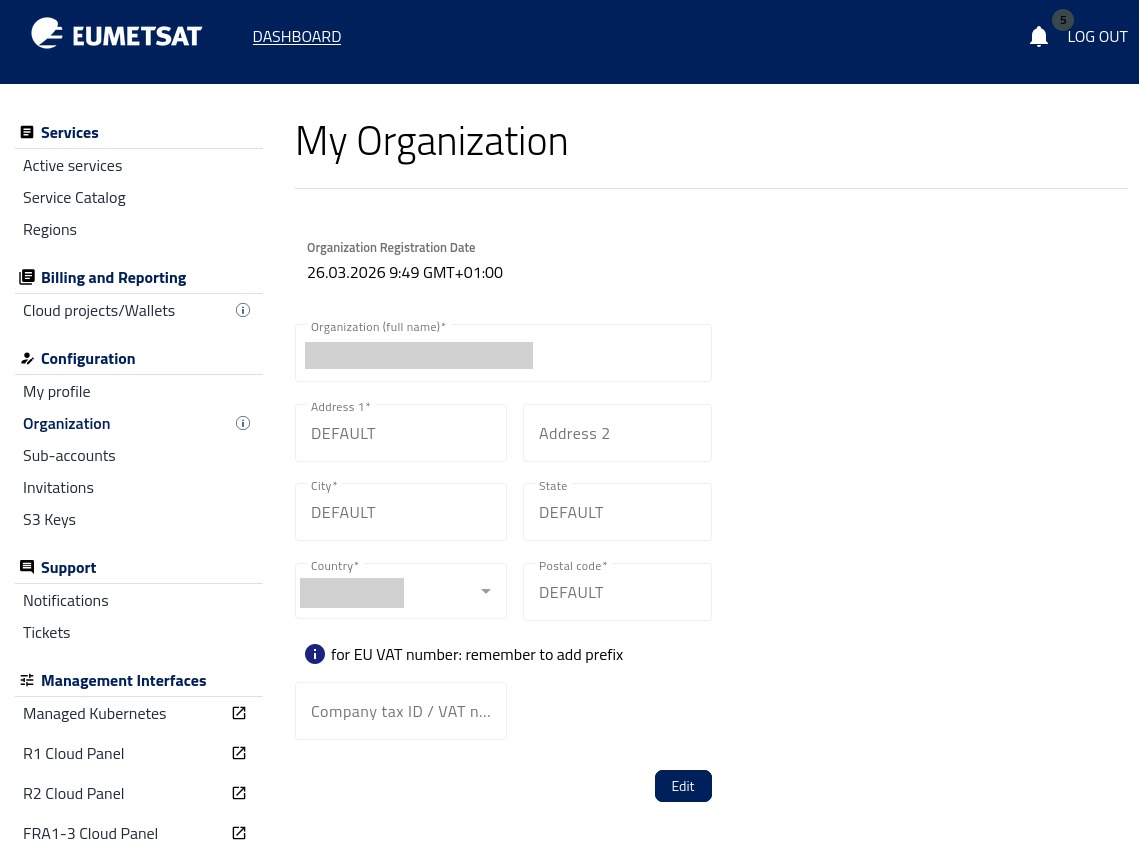
When your account is created, the operator usually enters the initial organization data during onboarding. You can later review this information and update it if needed.
The form may include the following fields:
organization full name,
address line 1,
address line 2,
city,
state,
country,
postal code,
company tax ID or EU VAT number.
To modify the information, click Edit.
After that, update the relevant fields and save the changes using Update information.
Use this section whenever your organization details change and you want to keep your account information current.
What to do next
After reviewing or updating your organization details, you may also want to:
manage organization members in /accountmanagement/Sub-accounts,
review pending access requests in Inviting new user to your Organization,
check billing-related information in Cloud projects and wallets,
contact the operator through Help Desk and Support if any organization data cannot be changed from the portal.